
Home / Applications / TRACTION
TRACTION · Documentation of case work
Case notes for citizen programmes, from daily schedule to finished report.
More time for the citizen and documentation that is complete.
Documentation often takes a large part of the time, and data is often incomplete. TRACTION can write the case notes as the work happens, in templates built for your workflows, so there is more time and presence with the citizen and a clear picture of the programme.
- What is it?
- An app on the phone and an application in the browser on the computer.
- Who uses it?
- Mentors, job consultants, support contact persons, care staff, temps, social workers and other professionals who follow citizens through a case.
- And the citizen?
- The citizen is known by a case number. Name and personal ID are only added to the finished report.
- What does it require?
- A phone with the app. The report comes in the template you and the municipality use today.

How it works
How it works
From observation to approved report
STEP 01
Record in a minute
The day's log is filled in on the phone. Numbers and times are tapped in, and the rest can be spoken.
STEP 02
Speech becomes text
What is said becomes text right away and can always be corrected.
STEP 03
A draft of the report
AI writes a draft from the notes, and you can see where every sentence comes from.
STEP 04
You approve
What you have approved goes into the report, and the numbers are calculated for you.
Your workflows
Templates built for your workflows
We build the templates after the way you work today, with your fields, your professional terms and the deliverable the authority expects. The same foundation can be used in many kinds of cases:
- Work trials and internships
- Mentoring programmes and stress coaching
- Resource programmes and support contact programmes
- Home care visits and handovers between shifts
- Action plans and cases in supported housing and social services
- Reports to job centres and municipalities
What you get
What you get out of it
- Less time on reports and double work.
- Reports of the same quality, whoever writes them.
- Numbers that add up and can be traced back to the day.
- The agenda for the follow-up meeting is ready before the meeting begins.
A good fit
TRACTION is a good fit when
- You document cases, visits or interventions for citizens every day.
- You follow citizens or employees through cases over several weeks.
- You send reports to a job centre or municipality.
- You write many notes in Word today.
- You want to be able to show the effect of your work.
Responsibility and trust
Roles from event to approved documentation
Records close to the event.
Assembles a draft where every sentence has a source.
Approves, and the authority makes the decisions about the citizen's case.
Ensures practice and quality.
Data is processed in the EU, and all changes are logged. Read more in the privacy policy (in Danish) →
In depth
Behind TRACTION
How does a case get started?
The intake interview is filled in once as a form: goals, special considerations, hours, meeting times and agreements. The plan is ready in the job centre's template with master data filled in, and the agreed interval drives the reminder for the next interim report. Special considerations are stored separately with extra protection.
What is in the daily log?
Arrival, tasks, breaks, concentration, shared breaks and absence. The fields follow the form you know today, and it takes under a minute to fill in. Everything becomes structured data the same day, so progress can be followed week by week.
How does speech to text work?
The fields that need words are spoken in, and 20 to 40 seconds is typically enough. The speech recognition is in Danish with a word list of your own professional terms. Only the professional's own voice is recorded, and the audio file is deleted once the text is approved.
How does TRACTION help with the follow-up meeting?
The agenda is filled in from the daily logs when the meeting begins: agreements from last time, meeting times, attendance, tasks and observations. What is agreed becomes a new hour plan, and the agenda can be downloaded as Word.
How is the AI draft created?
AI suggests dated entries under the headings, for example task performance, collaboration, motivation and stamina. Every entry shows the days and notes it builds on. The language model runs in the EU and only receives the observation text, while case number, special considerations and health information stay in the system.
How is the report finished?
Plan, interim reports and final evaluation are generated in your own template with attendance, hours, breaks and intensity calculated. Name and personal ID are inserted on export to Word, and all changes are logged with date and user.
Which cases does TRACTION fit?
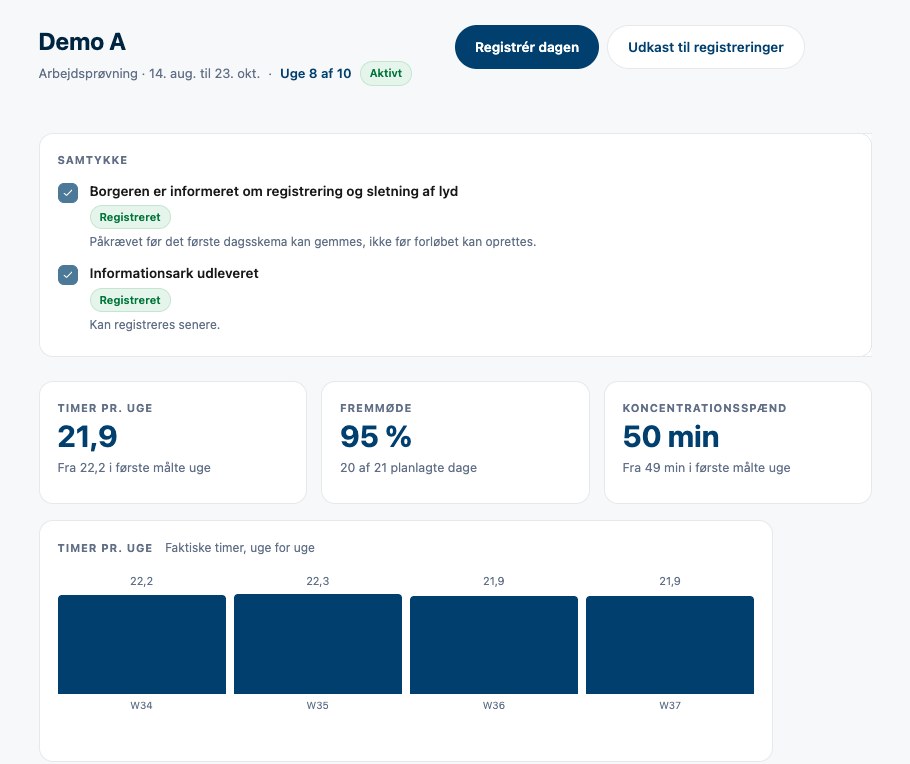
The example on the page is a work trial. We build templates for your own workflows, for example mentoring programmes, stress coaching, home care visits, handovers between shifts and action plans in supported housing.
Move the documentation closer to reality.
In a short meeting we clarify your challenges and the solutions that fit. We deliver the technology directly to companies and public organisations, or through a partner.
Together we clarify use, templates, approval and integrations. TRACTION is often part of Job activation & clarification and Wellbeing & work environment. See Care, elder care & social work → · See job programmes and clarification →